
EVG Fine Check Online in UAE: Check & Pay Traffic Fines
If you need to check a traffic fine in the UAE, an EVG Fine Check through Emirates Vehicle Gate (EVG) is one of the online options available for vehicle and traffic services. The UAE Government also lists MOI UAE, Abu Dhabi Police, Dubai Police, RTA Dubai and EVG among the digital platforms motorists can use to check or pay traffic fines.
You can use the appropriate service to look up a violation, review its details, check black points where applicable, and complete an online payment.
What Is EVG Fine Check?
EVG stands for Emirates Vehicle Gate. It is a UAE digital platform for vehicle and driver-related services.
An EVG fine check helps motorists look for traffic violations associated with their vehicle or traffic record. EVG has historically been designed as a central platform connecting vehicle and driver services across government and private-sector providers.
Depending on the enquiry service, traffic information can include:
- Traffic violation
- Fine amount
- Violation date
- Issuing authority
- Vehicle information
- Black points
- Payment status
- Fine reference information
The official EVG portal is: Emirates Vehicle Gate (EVG)
For sensitive information, use the official government service rather than entering your Emirates ID, Traffic Code, password, OTP or card details on an unrelated website.
How to Check EVG Fines Online
The exact screen names can change as government websites are updated, but EVG fine check online basic process is straightforward.
Step 1: Open EVG
Go to the official Emirates Vehicle Gate website.

Avoid using a search result that asks you to pay an additional service fee just to display your traffic record.
Step 2: Choose the Fine Enquiry Service
Open the traffic fine or violation enquiry service available on the portal.
The information requested depends on the search method.
Step 3: Enter Your Details
The search can involve vehicle or driver information such as:
- Plate Number
- Plate Code
- Emirate
- Traffic Code Number
- Driving Licence Number
Use the details exactly as they appear in your official records.
Step 4: Complete Verification
If the service displays a security check or authentication screen, complete it before submitting the enquiry.
Step 5: Review Your Traffic Fine
Check the result carefully. Look for:
- Fine description
- Fine amount
- Violation date
- Issuing authority
- Black points
- Vehicle information
- Payment status
If the information is incorrect or the fine is not found, check the platform of the authority that issued the violation.
How to Check Traffic Fines by Plate Number
A Plate Number is one of the most useful details when checking a vehicle-related traffic violation.
You may need:
- Emirate of registration
- Plate Code
- Plate Number

For example, if the vehicle is registered in Abu Dhabi, select the relevant Abu Dhabi plate information before submitting the enquiry.
A plate-based search is useful when you want to investigate fines associated with a particular vehicle.
If you are checking your personal traffic record rather than one vehicle, a Traffic Code Number or Driving Licence Number search may be more appropriate when that option is provided.
What Is a Traffic Code Number?
A Traffic Code Number, sometimes shown as a T.C. Number or Traffic Code, is an identifier used within UAE traffic services.
It should not be confused with:
- Emirates ID
- Driving Licence Number
- Vehicle Plate Number
- Vehicle registration number
A Traffic Code can be useful when searching for traffic records connected with a driver rather than relying only on one vehicle’s plate.
If you are unsure which number to enter, use the label shown on the government service instead of guessing.
Can You Check Fines Using a Driving Licence?
Some UAE traffic services allow motorists to search or manage traffic fines using a driving licence number or other licence-related information.
The general process is:
- Open the relevant official traffic service.
- Select the licence-related enquiry option.
- Enter the requested licence details.
- Complete verification.
- Submit the enquiry.
- Review the displayed violations.
This method can be useful for drivers who have used more than one vehicle.
Other Ways to Check EVG Fines
EVG is not the only government channel for traffic fines.
The UAE Government currently lists several official digital channels for traffic-fine enquiries and payments, including MOI, Emirates Vehicle Gate, Abu Dhabi Police, Dubai Police and RTA Dubai.
Traffic Fines Check Via MOI UAE
You can check your UAE traffic fines through the official MOI website by following these steps:
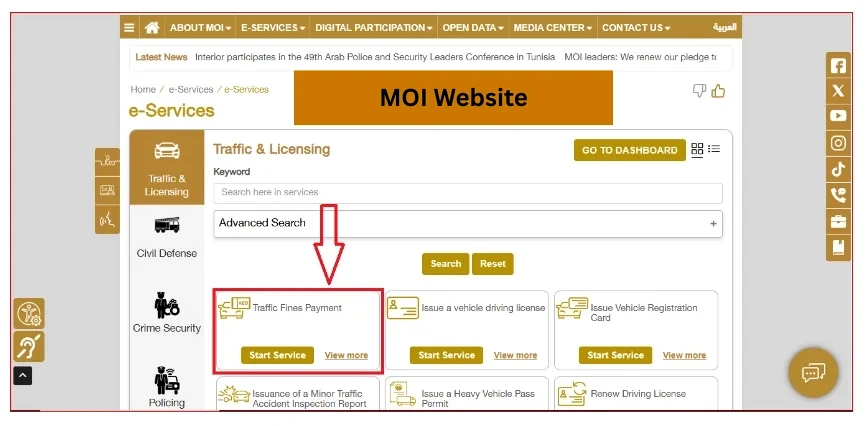
- Step 1: Visit the official MOI UAE website.
- Step 2: Open the traffic fine enquiry or payment service.
- Step 3: Select the emirate and year, if required.
- Step 4: Enter your Fine Number and complete the security check.
- Step 5: Click Search to view your traffic fine details.
Review the fine details carefully before proceeding with payment.
Traffic Fines Check Via Abu Dhabi Police
Traffic Fines Check Via Abu Dhabi Police
You can check your traffic fines through the official Abu Dhabi Police website by following these steps:

- Step 1: Visit the official Abu Dhabi Police website.
- Step 2: Open the Public Services section and select Traffic Fines Inquiry.
- Step 3: Choose your preferred inquiry method, such as a vehicle or traffic-related search option.
- Step 4: Enter the required details and submit your request.
- Step 5: Review your traffic fine details, including the fine amount and applicable black points.
You can also use other available Abu Dhabi Police services to check payment receipts, registered vehicles, and traffic-related records.e also provides the applicable fine amount and black points for a selected violation.
Traffic Fines Check Via Dubai Police
You can check and pay your Dubai traffic fines through the official Dubai Police website by following these steps:

- Step 1: Visit the official Dubai Police website.
- Step 2: Open the Fines Inquiry and Payment service.
- Step 3: Choose your preferred search method.
- Step 4: Enter your Vehicle Plate Number, Driving Licence Number, or Traffic Code.
- Step 5: Click Search to view your traffic fine details and proceed with payment if required.
Review the displayed fine details carefully before making a payment.
Traffic Fines Check Via TAMM
You can check and manage your traffic fines through the official TAMM portal by following these steps:

- Step 1: Visit the official TAMM website.
- Step 2: Open the Fines & Violations section.
- Step 3: Select the service you need, such as Traffic Fines Payment, Traffic Fines Statement, or Traffic Fines History.
- Step 4: Enter the required details to view your traffic fine information.
- Step 5: Review your fine details and choose the available service to make a payment, check your fine history, or download related information.
TAMM also provides services for Traffic Fines Clearance Certificates, Payment Receipt Inquiry, Fines Materials Inquiry, and transferring traffic points to a driving licence.
EVG vs MOI vs Police Services
| Platform | Best Use |
|---|---|
| EVG | Vehicle and traffic-related online services |
| MOI UAE | Federal traffic services and fine enquiries |
| Abu Dhabi Police | Abu Dhabi traffic fines and traffic records |
| Dubai Police | Dubai traffic violations and payments |
| TAMM | Abu Dhabi government transport and fine services |
If you know which authority issued the violation, starting with that authority’s official website is usually the quickest route.
How to Pay EVG Traffic Fines Online
Once you find your traffic fine through the relevant EVG or official government traffic service, follow these steps to complete the payment:

Step 1: Open the Official Service
Visit the official EVG website
Step 2: Search for Your Fine
Enter your Plate Number, Traffic Code Number or Driving Licence Number.
Step 3: Review the Fine Details
Check the violation, fine amount, date, issuing authority, black points where applicable and payment status.
Step 4: Select the Fine and Continue to Payment
Choose the fine you want to pay and proceed to the secure payment page.
Step 5: Complete the Payment
Enter the requested payment information and complete the transaction through the official portal.
Step 6: Save Your Receipt
Wait for payment confirmation and save the receipt or transaction reference for your records.
Do not attempt to pay again if your payment has been deducted but the fine still shows as unpaid. Check the payment status first and contact the relevant authority if necessary.
Dubai Police, for example, provides a combined fines enquiry and payment service, while RTA may provide a payment receipt after a successful transaction.
UAE Traffic Fine Amounts and Black Points
Traffic penalties in the UAE are not one fixed amount. The fine, black points and vehicle impoundment period depend on the violation.
For example, the UAE Government’s published traffic-penalty table lists:
| Example violation | Fine | Black Points |
|---|---|---|
| Wrong overtaking | AED 600 | 6 |
| Overtaking from the road shoulder | AED 1,000 | 6 |
| Parking in front of a fire hydrant or in spaces for people with support needs | AED 1,000 | 6 |
| Stopping in the middle of the road without a justified reason | AED 1,000 | 6 |
| Driving in a way that poses danger to life or safety of others | AED 2,000 | 23 |
| Driving without number plates | AED 3,000 | 23 |
Some serious violations also carry vehicle impoundment or other consequences.
These figures should be treated as examples from the applicable traffic regulations, not as a substitute for checking the actual violation record. For the penalty attached to a particular offence, use the current official authority’s fine information.
What Are Black Points?
Black points are traffic points recorded against a driver’s traffic record for certain violations.
The number of points depends on the seriousness of the offence. The UAE Government explains that black points are assigned according to the violation and can accumulate on the driver’s record.
Black points are separate from the monetary fine.
For example:
- A violation may have a financial fine but no black points.
- Another offence may have both a fine and black points.
- Serious offences can carry a high number of black points and additional vehicle or licence consequences.
Abu Dhabi Police’s current fine-material service lets users look up the amount and black points associated with a specific violation.
Are Traffic Fine Discounts Available in the UAE?
Discounts are not a single UAE-wide percentage that applies to every traffic violation.
They can depend on the emirate, authority, violation and current government initiative.
For example, Abu Dhabi Police announced in 2026 that its Bader Wastafid initiative offered a 35% discount when eligible fines were paid within the first 60 days, and 25% after 60 days up to one year, excluding dangerous violations. The announcement also described interest-free bank instalment options.
Because these offers can have conditions and expiry dates, check the official authority before assuming that a discount applies to your fine.
Can Traffic Fines Be Paid in Instalments?
Instalment options exist for some traffic-fine situations, but they are not automatically available for every fine.
For example, Dubai Police currently lists a Traffic Fines Instalment service, while Abu Dhabi Police has announced bank-based instalment arrangements under its payment initiative.
If you want an instalment plan, check:
- Which authority issued the fine
- Whether the fine qualifies
- Which banks or payment providers participate
- Whether the offer has an expiry date
- Whether additional conditions apply
Do not assume that an instalment option shown for Dubai or Abu Dhabi applies to every emirate.
Why Is My EVG Fine Not Showing?
If you expected a fine but cannot find it, check these points:
1. Check Your Details
Verify the:
- Plate Number
- Plate Code
- Traffic Code Number
- Driving Licence Number
2. Check the Issuing Authority
A violation may be easier to locate through the authority that recorded it.
3. Check Again Later
A recently issued violation may take time to appear in a particular digital service.
4. Check Your Payment Status
If you already paid the fine, do not pay it a second time until you confirm whether the first transaction succeeded.
For unresolved problems, use the support channel of the relevant government authority.
What If an Online Fine Payment Fails?
If your payment does not go through:
- Check whether your bank actually charged the card.
- Look for a transaction reference.
- Check the fine status before attempting another payment.
- If the money was deducted but the fine remains unpaid, contact the relevant authority with the payment reference.
- Keep the receipt or bank confirmation.
This prevents accidental duplicate payments.
How Long Does an EVG Fine Take to Update?
There is no single update time that applies to every UAE traffic violation.
A newly recorded fine can take time to appear in a particular platform, while payment status can also require an update after a successful transaction.
If the fine is recent, check again later. If the record still does not appear, use the issuing authority’s traffic service.
For Abu Dhabi, for example, the government services include separate Traffic Fines History, Traffic Fines Statement and Payment Receipt Inquiry services through TAMM.
How to Stay Safe When Checking Traffic Fines
Traffic-fine services require personal and vehicle information, so use basic security precautions:
- Use the official government website.
- Check the domain before entering login details.
- Never share an OTP with another person.
- Do not approve an unexpected UAE Pass request.
- Do not send your card details through WhatsApp or social media.
- Keep your payment receipt.
- Avoid websites that claim they can remove a government fine without explaining the official process.
The UAE Government itself directs motorists to official digital channels such as MOI, EVG, Abu Dhabi Police, Dubai Police and RTA Dubai for traffic-fine services.
Parking violations are also recorded as fines; check the Sharjah parking timings to avoid them.
FAQS
Can I check an EVG fine without my plate number?
Yes, where the selected service supports another identifier, such as a Traffic Code Number or Driving Licence Number. The available search method depends on the government service.
Can I check a Dubai fine through EVG?
EVG is one of the UAE’s traffic-service channels, but Dubai Police has its own fines enquiry and payment service. If you know that Dubai Police issued the violation, you can check the Dubai Police service directly.
Can I check an Abu Dhabi fine online?
Yes. Abu Dhabi Police and TAMM both provide online traffic-fine services. TAMM currently lists Traffic Fines Payment, Traffic Fines History, Traffic Fines Statement and related services.
Can I check black points separately from the fine amount?
Yes. Abu Dhabi Police provides a fine-material enquiry that shows the applicable amount and black points for a selected violation.
Can an old traffic fine be paid in instalments?
It depends on the authority and the payment programme. Dubai Police lists a traffic-fines instalment service, while Abu Dhabi Police has also announced bank instalment arrangements under its current initiative. Check the eligibility of the specific fine before applying.
What should I do if I paid a fine but it still appears unpaid?
First check your payment receipt and transaction status. If your bank deducted the money, keep the transaction reference and contact the authority that processed the payment rather than paying again immediately.
Can I get a traffic fine clearance certificate?
Yes. Abu Dhabi’s TAMM platform currently lists a Traffic Fines Clearance Certificate service, and Dubai Police also provides traffic-clearance services.
Does every traffic violation have black points?
No. Black points depend on the specific violation. The official UAE traffic tables and authority services identify the points assigned to individual offences.
Conclusion
The quickest way to handle an EVG fine check is to use the official government traffic service and search with the identification details requested by that service.
For a vehicle-related enquiry, keep your Plate Number and Plate Code ready. For driver-related records, a Traffic Code Number or Driving Licence Number may be useful where supported.
If you cannot find the violation through EVG, check the official service of the issuing authority, such as MOI UAE, Abu Dhabi Police, Dubai Police, TAMM or RTA Dubai.
Before paying, confirm the violation, amount and black points. After payment, save the receipt and verify the status if the record does not update.
For current fine amounts, discounts, instalment schemes and penalties, always rely on the latest information published by the relevant UAE government authority.