
How to Activate FAB Credit Card Online (Step-by-Step Guide 2026)

Activate FAB Credit Card Online is the fastest way to start using your new card. It helps you save time and avoid long bank visits. Today, most banking tasks are done online. So, activating your credit card is also simple and quick.
In this guide, you will learn each step to know how to activate FAB credit card online. You will also learn how to check your FAB balance and manage your card. So, let’s start and make everything easy for you.
Why activate your FAB Bank credit card online?
Activating your credit card online is very easy and fast. You do not need to visit the bank. You can do it from your home. This saves your time and effort. Also, the process is safe and secure. Your personal details stay protected.
Moreover, online activation is quick. Your card becomes ready to use in minutes. After activation, you can shop online or in stores. You can also pay bills and manage your money easily. In addition, you get access to many features.
How to activate your FAB Bank credit card online?
The process to activate your card is simple. You just need the internet and your card details. First, you must register for online banking or download the mobile app.
Then, you log in and find the card section. Follow our steps below:
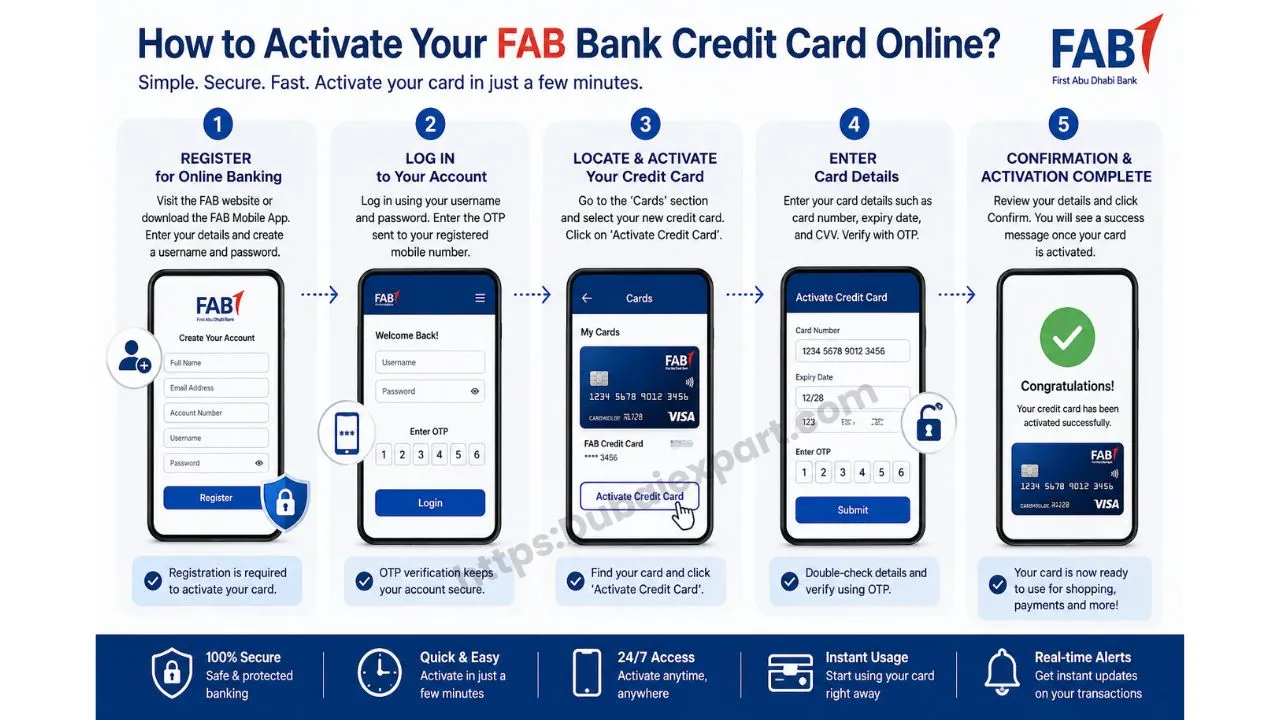
Step 1: Register with the FAB Online Banking App or Mobile App
First, you need to register for online banking. This is very important. Without registration, you cannot activate your card. So, go to the official website or download the mobile app.
Next, enter your details. For example, your name, email, and account number. Then, create a username and password. Make sure your password is strong. Also, follow all instructions carefully. After that, your account will be ready. Now, you can move to the next step.
Step 2: Log in to your FAB Online Banking account
Now, open the app or website. Then, enter your username and password. Make sure you type the correct details. If the details are wrong, the login will fail.
Sometimes, you will get an OTP code. This code is sent to your phone. Enter the code to continue. This step is for security. It keeps your account safe. After logging in, you will see your dashboard. Now, you are ready for the next step.
Step 3: Locate and activate your credit card
After logging in, go to the “Cards” section. This section shows all your cards. Now, find your new credit card.
Then, click on “Activate Credit Card.” This option is easy to find. The system will guide you next. So, follow each instruction. This step is simple and quick. Now, move forward to enter your details.
Step 4: Enter Your Credit Card Details
In this step, you must enter card details. For example, card number, expiry date, and CVV code. Make sure all details are correct.
Also, double-check everything before submitting. If details are wrong, activation may fail. Sometimes, you will get an OTP. Enter it to confirm your identity. This step is very important for safety. After this, you are close to activation.
Step 5: Confirmation and completion of the activation
Now, review all your details. Make sure everything is correct. Then, click confirm. After that, your card will be activated.
You will see a confirmation message. This means your card is ready. Now, you can use it for shopping and payments. Also, you can start managing your card online. This step completes the process.
Benefits of Online Credit Card Management
Online management gives many benefits. First, you can pay bills easily. No need to visit the bank.
- Quick and easy process, takes only a few minutes
- No need to visit the bank or stand in long lines
- Available 24/7, you can activate anytime
- Safe and secure with OTP verification
- Instant access to use your credit card after activation
- Easy to manage your card through the app or website
- Helps you track spending and control your budget
- Access to real-time alerts for transactions and payments
- Ability to check balance anytime from anywhere
- Easy bill payments without any hassle
- Option to lock or unlock your card for safety
- Access to rewards, offers, and cashback deals
Troubleshooting: How to fix issues
Sometimes, you may face problems. But do not worry. First, check your card details again. Make sure everything is correct. Next, check your internet connection. Also, make sure your login details are right. If the problem continues, contact customer support. They are available 24/7. They will help you quickly.
FAQs
1. How long does it take to activate a FAB credit card online?
It takes only a few minutes. Once done, your card is ready to use.
2. Can I activate my card without the mobile app?
Yes, you can use online banking on the website.
3. Is online activation safe?
Yes, it is very safe. It uses OTP and security checks.
4. What if my activation fails?
Check your details and try again. If still not working, contact support.
5. Can I use my card right after activation?
Yes, you can use it immediately after activation.
Conclusion
Activating your FAB Credit Card Online is the easiest and fastest way to start using your card. It saves time and gives full control of your finances.
In conclusion, the process is simple and safe. You just follow a few steps. Then, your card is ready. Also, you can check your balance and manage everything online. So, use this guide and enjoy easy banking.
Related Guide