
How to Cancel FAB Credit Card: A Step-by-Step Guide

Are you trying to cancel your FAB Credit Card, but don’t know where to start? Many people feel confused when they try to cancel their card for the first time. Cancel FAB Credit Card is not difficult if you follow the right steps. First Abu Dhabi Bank (FAB) gives many easy ways to close your card. In this guide, you will learn all the methods, steps, tips, and important things. So, keep reading!
FAB Credit Card Cancellation
Canceling a credit card means closing your account with the bank. After cancellation, you cannot use your card again. So first, you must understand what happens when you cancel it. It is a simple process, but you must follow the correct steps.
Also, before you cancel your FAB credit card, you must clear all dues. This includes pending bills, loans, or charges. If you do not clear them, your request may be rejected. Therefore, always check your FAB balance first.
Canceling a card can affect your credit score. So, you must think carefully. If you have many cards, then canceling one may help you manage money better. But if it is your only card, then your credit history may be reduced.
Reasons to Cancel FAB Credit Card
There are many reasons why people decide to cancel their credit cards.
1. Better Control of Money
People cancel their FAB credit cards to control spending. It helps them avoid unnecessary expenses.
2. High Interest Charges
High interest rates make payments costly. So, users cancel the card to avoid growing debt.
3. Not Using the Card
If the card is not used, it is useless to keep it active. So, many people close it to avoid fees.
4. Better Card Options Available
Some users find better credit cards with more rewards. So, they switch and cancel the old one.
5. Avoid Annual Fees
Unused cards still have yearly charges. People cancel them to save money on fees.
6. Improve Financial Planning
Canceling helps people stay disciplined with money. It reduces the chance of overspending.
Methods to Cancel FAB Credit Card
There are many easy methods to cancel your FAB credit card. You can choose the one that suits you best. All methods are simple and safe.
| Method | Details | Time | Cost |
|---|---|---|---|
| Online Banking | Cancel through the FAB website | 1–2 days | Free |
| Mobile App | Use the FAB mobile app | 1–2 days | Free |
| Phone Call | Call customer support | 1–2 days | Free |
| Send a request via email | 2–3 days | Free | |
| Branch Visit | Visit the FAB branch | 1–2 days | Free |
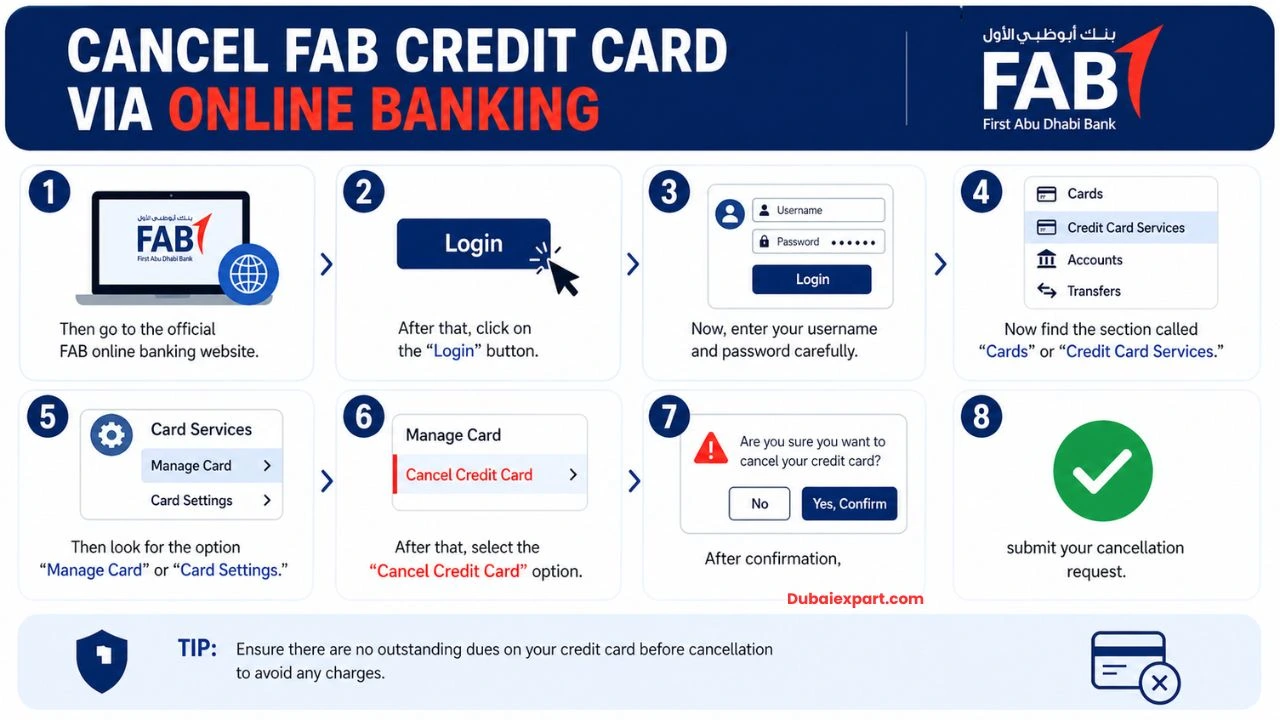
Cancel FAB Credit Card via Online Banking
- First, open your mobile or computer browser
- Then go to the official FAB online banking website
- After that, click on the “Login” button
- Now, enter your username and password carefully
- Then complete the security check (OTP or verification code)
- After logging in, go to the main dashboard
- Now find the section called “Cards” or “Credit Card Services.”
- Click on your active FAB credit card
- Then look for the option “Manage Card” or “Card Settings.”
- After that, select the “Cancel Credit Card” option
- Now, read the instructions shown on the screen carefully
- Make sure all pending dues are already paid
- Then confirm your identity again if asked (OTP or security question)
- After confirmation, submit your cancellation request
- Finally, wait for the approval message from FAB
- You will receive SMS or email confirmation when the card is closed
FAB Credit Card Cancelation via Mobile Banking App
- First, open the Google Play Store or App Store. Download and install the FAB Mobile Banking App
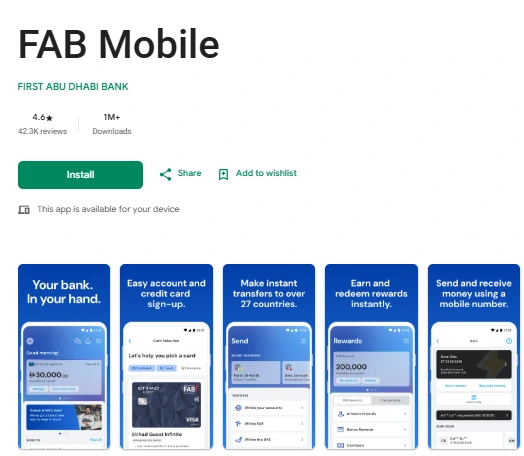
- Then open the app on your phone. Now tap on the “Login” option. Enter your account details (username and password)
- Complete OTP verification for security. After logging in, go to the “Accounts” or “Cards” section. Select your credit card from the list
- Tap on the “Card Management” option. Then find the “Cancel Card” or “Close Credit Card” option. Read all instructions carefully on the screen
- Make sure your bill is fully paid. Then confirm the cancellation request. Enter OTP again if required. Submit final request
- Wait for the confirmation message from FAB. Your card will be closed in 1–2 working days
Cancel FAB Credit Card by Phone Call
- First, take your registered mobile phone. Then dial the FAB customer service number. Listen carefully to the IVR menu options
- Select the option for credit card services. Then choose “Talk to agent” or “Customer support”. After connecting, tell the agent you want to cancel the card.
- The agent will ask for your card details. Provide your credit card number and personal information. Then, answer security questions for verification
- The agent will check your account status. Make sure there is no pending balance. Then confirm your cancellation request.
- The agent will submit the request on your behalf. You will receive confirmation via SMS or email. Save this confirmation for future reference.
FAB Credit Card Cancelation via Email
- First, open your email account. Then click on “Compose New Email.” Write the FAB customer support email in the recipient field
- In the subject line, write: “Request for Credit Card Cancellation.” Then start the email politely. Write your full name and account details
- Mention your credit card number clearly. Then clearly request card cancellation. Also mention the reason (optional), like not needed or financial control
- Attach a copy of ID if required (Emirates ID or passport). Make sure all details are correct. Then recheck your email carefully. Click on the “Send” button
- Wait for a reply from the FAB support team. They may ask for verification. After approval, you will get a confirmation email
FAB Credit Card Cancelation by Visiting a Branch
- First, find the nearest FAB branch location. Then check working hours before going. Visit the branch with a valid ID (Emirates ID or passport)
- Also, carry your FAB credit card. Go to the customer service desk. Take a token if required. Wait for your turn patiently.
- Then meet the bank representative. Tell them clearly you want to cancel the credit card. The officer will guide you through the process.
- Fill the credit card cancellation form carefully. Provide all required personal details. Submit your credit card and documents
- Make sure all dues are cleared before submission. Then wait for final processing
- You will receive written confirmation of cancellation. Keep the receipt safe for future use
FAQs
1. How long does it take to cancel the FAB credit card?
It usually takes 1–3 business days.
2. Is there any fee to cancel the FAB credit card
No, it is free.
3. Can I cancel my FAB card online?
Yes, you can use online banking or a mobile app.
4. Do I need to clear dues before cancellation?
Yes, you must pay all pending amounts.
Conclusion
Canceling the FAB Credit Card is easy if you follow the correct steps. You have many options like online banking, mobile app, phone, email, and branch visit. Cancel FAB Credit Card safely by clearing dues and checking all details. Always follow the right process to avoid problems.
Related Guide
- Ratibi Balance Check
- How to Change Mobile Number in FAB Ratibi Card
- How to Transfer Money from Ratibi Card
- How to Deactivate FAB Debit Card
- How to Open FAB iSave Account Online
- How to Activate FAB Credit Card Online